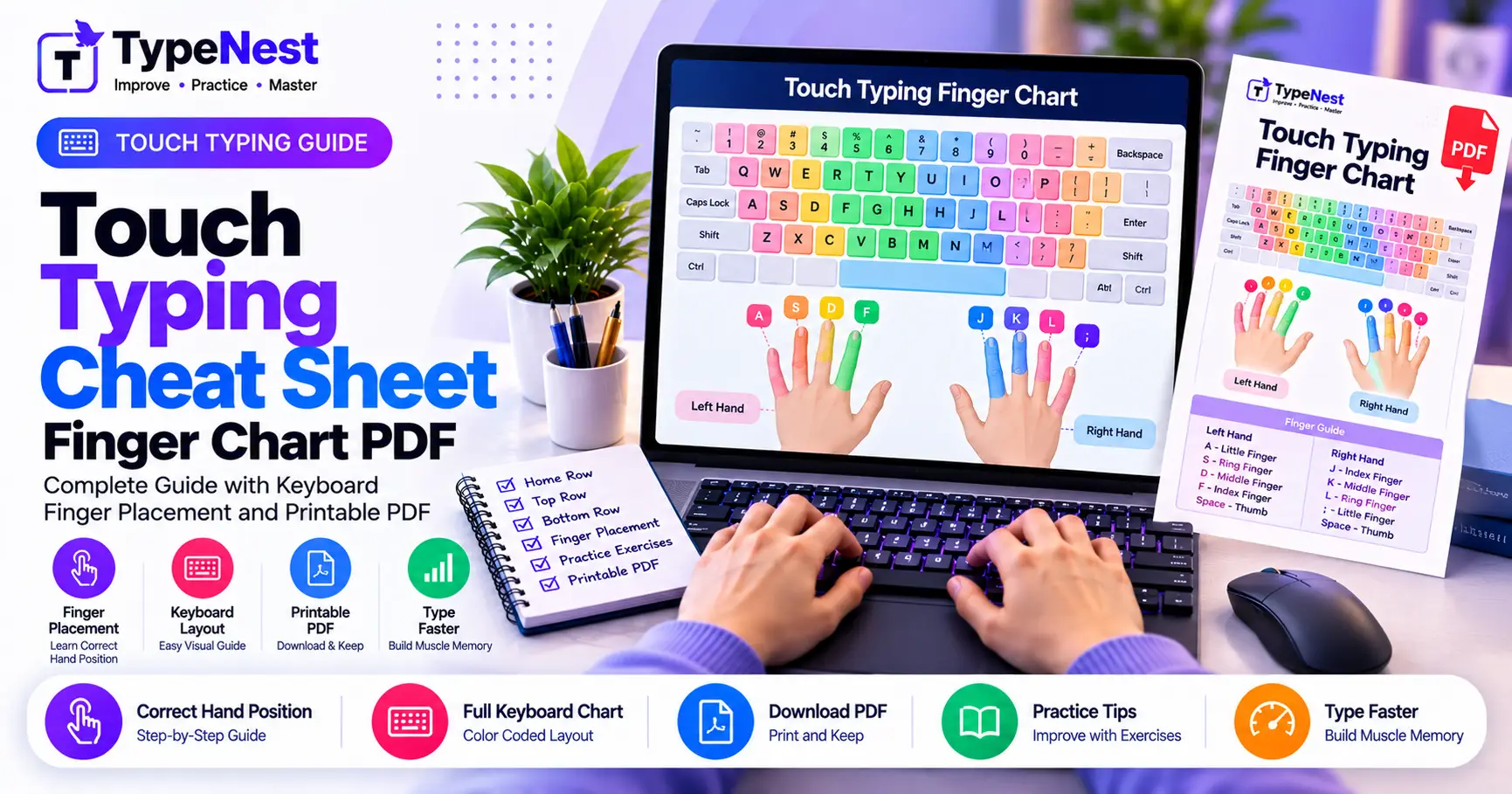
1. Home Row Anchors: Your Subconscious Basecamp
Touch typing functions through physical spatial orientation. Before typing any word, both hands must rest on the Home Row:
Left Hand Base: A - S - D - F
Pinky on A, Ring finger on S, Middle finger on D, and Index finger resting on F. The tactile raised bar on F guides your left hand into place without looking.
Right Hand Base: J - K - L - ;
Index finger on J, Middle finger on K, Ring finger on L, and Pinky on ; (Semicolon). The tactile bump on J provides instant tactile confirmation.
2. Left Hand Key Assignment Matrix
Your left hand is responsible for 15 primary keys across four vertical zones:
| Finger | Home Key | Upper Row | Bottom Row | Number / Symbol |
|---|---|---|---|---|
| Left Pinky | A | Q | Z | ` ~ 1 ! Tab Caps Shift |
| Left Ring | S | W | X | 2 @ |
| Left Middle | D | E | C | 3 # |
| Left Index | F (Anchor) & G | R, T | V, B | 4 $, 5 % |
3. Right Hand Key Assignment Matrix
Your right hand manages the larger half of the board, including essential modifier keys and primary punctuation:
| Finger | Home Key | Upper Row | Bottom Row | Number / Symbol |
|---|---|---|---|---|
| Right Index | J (Anchor) & H | U, Y | M, N | 6 ^, 7 & |
| Right Middle | K | I | , < (Comma) | 8 * |
| Right Ring | L | O | . > (Period) | 9 ( |
| Right Pinky | ; : & ' " | P, [ {, ] } | / ? | 0 ), - _, = +, Enter, Backspace |
4. The Opposite-Shift Synchronization Rule
One of the most frequent sources of wrist strain is holding Shift with the same hand that strikes the target character. Follow the universal Opposite-Shift Rule:
Balance Your Hands
- To capitalize a letter typed with the Left Hand (e.g.,
Q, W, E, R, T, A, S, D, F, G, Z, X, C, V, B): Hold the Right Shift key with your right pinky. - To capitalize a letter typed with the Right Hand (e.g.,
Y, U, I, O, P, H, J, K, L, N, M): Hold the Left Shift key with your left pinky.
5. The 5 Golden Rules of Blind Touch Typing
- Never Glance Down: Looking at your hands resets muscle memory. Use the tactile bumps on F and J to orient yourself blindly.
- Return to Basecamp: After every upward or downward stroke, let your fingers snap back to rest gently on the home row keys.
- Float Your Wrists: Keep wrists parallel to the desk. Resting your palms on hard surfaces pins tendons down and restricts movement.
- Accuracy First: Speed is a byproduct of precision. Type slow enough to maintain 98%+ accuracy.
- Use Both Thumbs: Assign your dominant thumb to the Spacebar, leaving the other relaxed.
6. 5-Minute Daily Calibration Drills
Type these classic pangrams and finger-reaches for 5 minutes before beginning your work day or typing test:
// Drill 1: Full Alphabet Exercise (Pangram)
The quick brown fox jumps over the lazy dog. Pack my box with five dozen liquor jugs.
// Drill 2: Home-to-Upper Reach Stretch
aqswdefr gthyjuki lol;p frju deki swlo aq;p
7. Frequently Asked Questions (FAQs)
Why does the right pinky control so many keys?
Standard QWERTY layout evolved from mechanical typewriters where punctuation was relegated to the perimeter. With practice, the right pinky naturally builds precision for Enter, Backspace, and brackets.
Can I print this cheat sheet?
Yes! Press Ctrl+P (or Cmd+P on Mac) to print or save this reference guide as a PDF for quick desktop reference.
Conclusion
Touch typing is an automatic motor reflex that frees your cognitive focus. Keep this cheat sheet bookmarked, adhere to strict finger boundaries, and calibrate your daily muscle memory on TypeNest.
Continue Learning
Last Updated: October 2026
Author: TypeNest Editorial Team