🌐 Typing Resources

Best Free Typing Websites Compared in 2026

Compare the best free typing websites based on lessons, typing tests, progress tracking, games, and learning features to find the right platform for improving your typing speed and accuracy.

📅 Updated: July 2026 ⏱️ 15 min read 👤 TypeNest Team

Introduction

Learning to type efficiently has become more important than ever. Whether you are a student completing assignments, a professional handling emails, a programmer writing code, or a government exam candidate preparing for typing tests, strong typing skills can save time and improve productivity. Fortunately, there are many free typing websites available online that help users improve typing speed, accuracy, and keyboard confidence. These platforms provide structured lessons, typing games, speed tests, progress tracking, and touch typing exercises designed for beginners as well as advanced typists. However, not all typing websites offer the same experience. Some focus on touch typing lessons, while others specialize in typing speed tests, competitive leaderboards, or exam preparation. Choosing the right platform can significantly affect your learning progress. In this guide, we compare the best free typing websites available in 2026 and explain their strengths, weaknesses, features, and ideal use cases. By the end of this article, you will know which platform is best suited for your personal typing goals.

Why Choosing the Right Typing Website Matters

Many learners assume that all typing websites provide the same experience. In reality, the quality of lessons, typing exercises, progress tracking, and user interface varies significantly between platforms. A good typing website should do more than simply display words on a screen. It should help users build proper typing habits, improve accuracy, track performance, and gradually increase typing speed through structured learning. Choosing the wrong platform can slow your progress and make practice less effective. Some websites focus heavily on speed while ignoring accuracy, while others provide excellent lessons but lack performance tracking features.

Features of a Good Typing Website

  • Structured typing lessons.
  • Touch typing training.
  • Real-time WPM calculation.
  • Accuracy tracking.
  • Progress monitoring.
  • Typing tests of different durations.
  • User-friendly interface.
  • Mobile and desktop compatibility.

The best typing websites combine these features into a single learning experience that keeps users motivated and helps them improve consistently.

1. TypeNest

TypeNest is a modern typing platform designed to help users improve both typing speed and accuracy through structured lessons and realistic typing tests. Unlike many traditional typing websites that focus only on typing speed, TypeNest combines learning modules, typing tests, performance tracking, leaderboards, user profiles, and progress monitoring into a single platform. The platform is suitable for beginners learning keyboard fundamentals as well as experienced typists looking to improve WPM and accuracy.

Key Features of TypeNest

  • Structured typing lessons.
  • Home Row, Top Row, Bottom Row practice.
  • Word and Number typing exercises.
  • Timed typing tests.
  • Leaderboard rankings.
  • User profiles and performance tracking.
  • Recent test history.
  • Accuracy monitoring.

For users looking for a complete learning environment rather than just a typing test website, TypeNest provides a balanced combination of training and performance measurement tools.

2. TypingClub

TypingClub remains one of the most popular free typing websites in the world. It is particularly well suited for beginners because it provides step-by-step lessons that gradually introduce new keys and typing techniques. The platform focuses heavily on touch typing and includes hundreds of lessons covering keyboard fundamentals, finger placement, and typing accuracy. Many schools and educational institutions use TypingClub because of its structured learning approach and easy-to-follow lesson system.

Advantages of TypingClub

  • Excellent beginner lessons.
  • Structured learning path.
  • Touch typing focused.
  • Progress tracking.
  • Interactive exercises.

TypingClub is an excellent choice for users who are completely new to typing and want a guided learning experience.

3. Monkeytype

Monkeytype has become extremely popular among advanced typists and typing enthusiasts. The platform focuses on typing tests, customization, and performance tracking. Users can customize test duration, word lists, themes, fonts, and various typing settings. This flexibility makes Monkeytype one of the most feature-rich typing websites available today. The platform also provides detailed statistics that help users analyze typing performance and identify areas for improvement.

Advantages of Monkeytype

  • Highly customizable tests.
  • Detailed typing statistics.
  • Modern user interface.
  • Competitive leaderboards.
  • Excellent for advanced users.

Monkeytype is best suited for users who already understand touch typing and want to maximize typing speed and performance.

4. Keybr

Keybr takes a unique approach to typing improvement. Instead of focusing on random words, it generates exercises specifically designed to strengthen weak keys and improve finger coordination. The platform uses intelligent algorithms to analyze typing behavior and create personalized exercises. This helps users improve weaknesses more efficiently than traditional typing drills. Because of its adaptive learning system, Keybr is often recommended for users who have reached a performance plateau and need targeted practice.

Advantages of Keybr

  • Personalized lessons.
  • Adaptive learning system.
  • Improves weak keys.
  • Simple interface.
  • Strong focus on accuracy.

Keybr is particularly effective for intermediate typists who want to eliminate weaknesses and increase consistency.

5. Nitro Type

Nitro Type is one of the most entertaining typing websites available today. Instead of traditional typing lessons, it uses racing games to motivate users and improve typing speed. Players compete against other users in real-time typing races. The faster and more accurately a user types, the faster their virtual car moves on the track. This gamified approach makes typing practice more enjoyable, especially for younger learners and students who may find traditional lessons repetitive.

Advantages of Nitro Type

  • Fun and engaging gameplay.
  • Real-time multiplayer races.
  • Competitive environment.
  • Improves typing speed naturally.
  • Suitable for students and beginners.

Nitro Type is ideal for users who learn better through games and competition rather than structured lessons.

6. Ratatype

Ratatype is a beginner-friendly typing website that focuses on touch typing education and typing certification. The platform offers structured lessons that teach proper finger placement, keyboard familiarity, and typing fundamentals. Users can also earn typing certificates after completing typing tests. Its simple interface and educational approach make it particularly suitable for schools and self-learners.

Advantages of Ratatype

  • Free typing lessons.
  • Typing certificates.
  • Touch typing training.
  • Simple user interface.
  • Suitable for beginners.

Ratatype is a strong choice for users who want structured lessons and formal proof of their typing skills.

7. Typing.com

Typing.com is one of the most widely used typing education platforms in schools and educational institutions. The website offers typing lessons, games, tests, and progress tracking tools. It provides a complete learning path that helps beginners gradually improve typing skills from basic keyboard familiarity to advanced typing proficiency. Many teachers and educational organizations use Typing.com because of its classroom-friendly features and structured lesson plans.

Advantages of Typing.com

  • Comprehensive typing curriculum.
  • Educational lessons.
  • Typing games.
  • Progress reports.
  • School-friendly platform.

Typing.com is best suited for students, teachers, and beginners who prefer a structured educational environment.

Comparison of the Best Free Typing Websites

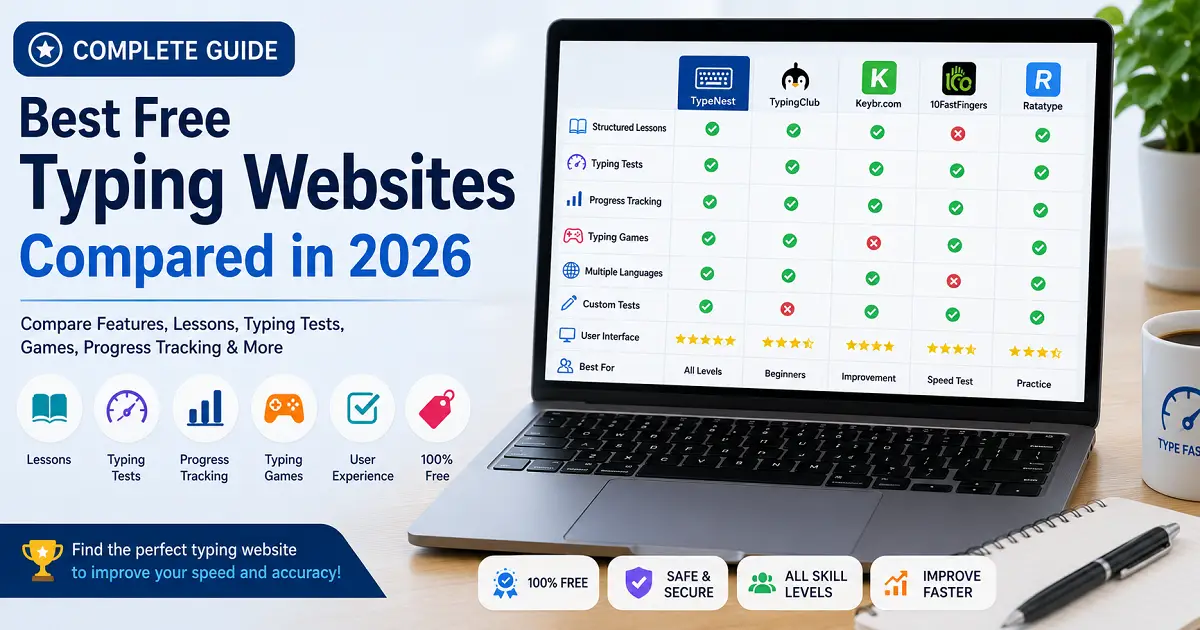
Each typing website serves a different purpose. Some focus on structured learning, while others prioritize speed testing, competition, or advanced performance tracking. The table below summarizes the primary strengths of each platform.

  • TypeNest – Complete learning and testing platform.
  • TypingClub – Best for beginners.
  • Monkeytype – Best for advanced typists.
  • Keybr – Best for personalized training.
  • Nitro Type – Best for typing games.
  • Ratatype – Best for typing certificates.
  • Typing.com – Best for students and schools.

Which Typing Website Is Best for Beginners?

Beginners should focus on websites that provide structured lessons and proper touch typing instruction. Learning keyboard fundamentals correctly from the beginning prevents bad habits and creates a stronger foundation for future improvement. The best beginner-friendly options include:

  1. TypingClub
  2. Typing.com
  3. Ratatype
  4. TypeNest

These platforms guide users through lessons step by step and emphasize proper finger placement, accuracy, and typing technique.

Which Typing Website Is Best for Intermediate Users?

Intermediate typists typically understand basic keyboard skills but want to increase speed and consistency. At this stage, performance tracking and targeted practice become more important than introductory lessons. Recommended options include:

  • TypeNest.
  • Keybr.
  • Monkeytype.

These platforms help users identify weaknesses, track progress, and improve specific aspects of typing performance.

Which Typing Website Is Best for Advanced Typists?

Advanced typists usually focus on maximizing WPM, reducing mistakes, and competing against other skilled users. For this group, detailed statistics and customizable tests become essential. The most popular choices are:

  1. Monkeytype
  2. TypeNest
  3. Nitro Type

These websites provide advanced testing environments and performance analysis tools that help experienced typists push their limits.

How to Choose the Right Typing Website

The best typing website depends on your personal goals. If your goal is learning touch typing from scratch, a lesson-based platform is usually the best choice. If your goal is improving WPM and competing with other typists, a testing-focused platform may be more suitable. Before choosing a website, consider:

  • Your current typing skill level.
  • Your typing speed goals.
  • Your preferred learning style.
  • The importance of progress tracking.
  • Whether you enjoy games or structured lessons.

Selecting a platform that matches your learning style can significantly improve motivation and long-term progress.

Conclusion

The best typing website is not necessarily the one with the most features—it's the one that matches your current skill level and learning goals. Some platforms focus on touch typing lessons, while others specialize in typing tests, speed improvement, or advanced practice.

Throughout this comparison, we've explored the strengths of popular typing websites, the features they offer, and the type of learners they serve. Whether you're a beginner learning home row keys, a student preparing for exams, or an experienced typist trying to improve WPM, choosing the right platform can make practice more effective and enjoyable.

Key Takeaways

  • Choose a typing website that matches your current experience level.
  • Look for structured lessons instead of random typing exercises.
  • Track both typing speed and accuracy as you practice.
  • Practice consistently rather than switching between multiple platforms.
  • Use typing tests regularly to measure your progress.
  • Beginners should focus on touch typing before increasing speed.
  • Advanced users benefit from customizable typing tests and statistics.
  • Free platforms offer excellent learning opportunities for most users.
  • Compare features before deciding on a long-term practice platform.
  • Consistency matters more than the website you choose.

Which Website Should You Choose?

If you're just starting your typing journey, choose a platform with structured lessons and guided learning. Intermediate users should prioritize progress tracking and accuracy-focused practice, while advanced typists may prefer customizable typing tests and competitive challenges.

Ultimately, the best results come from practicing regularly on a single platform instead of constantly switching between different websites. Build a daily routine, monitor your improvement, and gradually challenge yourself with more difficult exercises.

The best typing website is the one you use consistently. Daily practice on a good platform will always outperform occasional practice on a perfect one.

Continue Learning

Once you've chosen a typing website, these guides will help you improve your speed, accuracy, and overall keyboard skills even further.

Keep Learning with TypeNest

Whether you're learning touch typing, improving your typing speed, or preparing for competitive exams, TypeNest provides structured lessons, typing tests, expert guides, and progress tracking to help you become a faster and more confident typist.

Keep practicing, keep measuring your progress, and continue exploring our free learning resources to build keyboard skills that will benefit you throughout your education and career.


Last Updated: July 2026
Author: TypeNest Editorial Team

🚀 Start Practicing with TypeNest

Build faster, more accurate keyboard skills with structured touch typing lessons, typing tests, progress tracking, and expert learning guides—all in one place.

Welcome Back

Login to continue your typing journey.