Why APIs Matter More Than Most People Realize
If you've ever ordered food online, checked the weather on your phone, signed in with your Google account, or paid for something using a digital wallet, you've already used an API—even if you've never heard the term before.
Modern websites and applications rarely work alone. A shopping website may need a payment gateway, a weather app needs live weather data, a travel website needs airline information, and a map on your phone needs location data. Instead of building every feature from scratch, developers allow different systems to communicate with each other. That communication happens through APIs.
Although the phrase Application Programming Interface sounds technical, the idea behind it is surprisingly simple. An API acts as a trusted messenger between two software applications. One application asks for information, the other processes the request, and the API delivers the response back in a format both applications understand.
Without APIs, many of the online services we use every day would either stop working or become much slower and more complicated. They help connect websites, mobile apps, cloud services, payment systems, social media platforms, and countless other digital tools that people depend on every day.
In this guide, you'll learn what an API is, how it works behind the scenes, why businesses and developers rely on it, and how APIs quietly power many of the digital experiences you use every single day.
A Simple Way to Understand an API
Imagine you're sitting in a restaurant. You don't walk into the kitchen and tell the chef what to cook. Instead, you speak to a waiter. The waiter carries your order to the kitchen, the chef prepares your meal, and the waiter brings it back to your table.
In this example:
- You are the client making a request.
- The waiter acts as the API.
- The kitchen represents the server.
- The food is the response returned to you.
The waiter never cooks the food. The waiter simply carries information between two sides. APIs work in exactly the same way. They don't create the data themselves—they simply help two different software systems communicate efficiently.
You're Already Using APIs Every Day
Many people assume APIs are only useful for programmers, but that's not true. Even if you've never written a single line of code, you probably use dozens of APIs every day without realizing it.
For example, when you open a weather application, it doesn't predict tomorrow's weather on its own. Instead, it sends a request to a weather service through an API. The weather provider returns information such as temperature, humidity, wind speed, and forecasts, which the app then displays on your screen.
The same thing happens when you use online maps. Your navigation app doesn't store maps for every city in the world. Instead, it requests location information through mapping APIs and displays the results almost instantly.
Online payment systems also depend heavily on APIs. When you purchase a product from an online store, the website securely communicates with payment providers to verify your payment before confirming your order.
Even something as simple as clicking "Sign in with Google" or "Continue with Facebook" uses authentication APIs that verify your identity without forcing you to create a new account.
Why Developers Prefer APIs Instead of Building Everything
Imagine building an online shopping website from scratch. Besides creating product pages, you would also need payment processing, maps for delivery, email notifications, SMS alerts, user authentication, currency conversion, shipping information, and much more.
Developing every one of these systems independently would take years. It would also require huge budgets and dedicated teams to maintain each feature.
Instead, developers integrate trusted APIs provided by companies that already specialize in these services. This approach saves time, reduces development costs, improves security, and allows businesses to focus on their own products instead of rebuilding technologies that already exist.
This is one of the biggest reasons APIs have become essential for modern software development. They encourage collaboration instead of duplication.
A Real Example You Can Relate To
Suppose you book a hotel through a travel website.
The website needs to display available rooms, prices, customer reviews, payment options, nearby attractions, and your booking confirmation.
Behind the scenes, multiple APIs may be working together:
- A hotel booking API provides room availability.
- A payment API securely processes your transaction.
- A maps API shows the hotel's location.
- An email API sends your booking confirmation.
- An SMS API delivers updates to your mobile phone.
Although you only see one website, several independent services communicate with each other within seconds. APIs make this entire process smooth and almost invisible to the user.
How APIs Help Build Better Websites
Modern websites are expected to do much more than display text and images. Visitors expect real-time information, secure payments, personalized recommendations, social logins, live chat support, and instant updates.
Meeting these expectations would be extremely difficult without APIs. They allow websites to connect with trusted external services while keeping everything organized and secure.
If you're interested in understanding how websites are planned and built before APIs are added, you can also read our guide on Web Development Basics for Beginners. It explains how different technologies work together to create modern websites.
How an API Actually Works Behind the Scenes
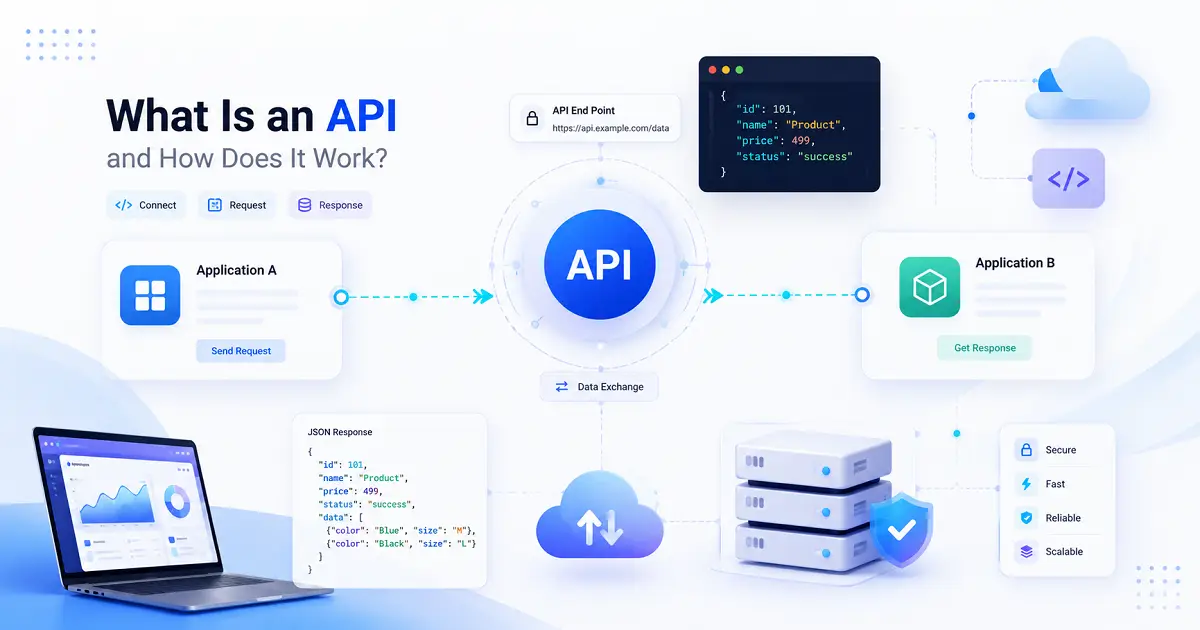
From a user's perspective, everything seems almost instant. You tap a button, submit a form, or search for information, and within a second the result appears on your screen. Behind that simple action, however, several systems are communicating with each other, and the API is responsible for making that communication possible.
Think of an API as a trusted delivery service. It carries requests from one application to another, waits for the requested information, and then returns the response in a format that the first application can understand. This entire process usually takes only a fraction of a second.
The impressive part is that users never see this communication happening. Everything works quietly in the background while providing a smooth experience.
Understanding the API Process Step by Step
Although APIs can become highly complex, the basic workflow follows the same pattern almost every time.
- A user performs an action.
- The application creates a request.
- The request is sent to an API.
- The API forwards the request to the server.
- The server processes the request.
- The server sends back the required information.
- The API returns the response to the application.
- The application displays the result to the user.
This entire exchange often happens so quickly that users never notice the multiple systems working together.
A Simple Online Shopping Example
Imagine you search for a wireless keyboard on an online shopping website.
After you click the search button, the website doesn't magically know which products to display. Instead, it sends an API request to the server asking for products related to your search.
The server checks its product database, finds matching keyboards, prepares the results, and sends them back through the API.
Within moments, your browser displays product names, prices, ratings, availability, and images.
Without APIs, this communication between your browser and the shopping platform would be far more complicated.
The Four Main Components of Every API
Almost every API communication involves four basic components. Understanding these makes APIs much easier to understand.
1. Client
The client is the application that starts the communication.
Examples include:
- Your web browser
- A mobile application
- Desktop software
- Smart TVs
- Smart watches
Whenever you tap a button, submit a form, or search for information, the client creates the API request.
2. API
The API acts as the communication layer between the client and the server.
It receives requests, verifies whether they are valid, forwards them to the appropriate service, and returns the response.
Rather than exposing an application's internal system directly, APIs provide a controlled and secure way to exchange information.
3. Server
The server stores data and performs the requested operations.
For example, a banking server stores account information, while an online shopping server stores products, prices, customer orders, and inventory details.
The server processes every request before sending a response.
4. Response
After processing the request, the server returns the required information.
The response may contain:
- User profile information
- Weather forecasts
- Product details
- Search results
- Payment confirmation
- Booking status
The application then displays this information in a way users can easily understand.
What Is an API Request?
Every API communication begins with a request.
A request tells the server exactly what information the application needs.
For example, when you search for "Laptop" on an e-commerce website, the request may ask the server to return every product that matches the word "Laptop."
Without a request, the server would have no idea what information the application is asking for.
What Is an API Response?
Once the server receives the request, it processes it and prepares a response.
The response contains the requested information.
For example, after searching for laptops, the response may include:
- Product names
- Prices
- Images
- Ratings
- Availability
- Discounts
The browser then converts this information into the webpage you see on your screen.
Understanding API Endpoints
An API endpoint is a specific address where an application sends its request.
You can think of it as the destination of a request.
Different endpoints perform different tasks.
For example, one endpoint may return weather information, another may process payments, while another retrieves customer profiles.
Keeping different services separate makes applications easier to maintain and more secure.
Common HTTP Methods Used by APIs
Most modern APIs communicate using standard HTTP methods. Each method has a specific purpose.
GET
GET retrieves information without changing existing data.
For example, opening a product page usually sends a GET request.
POST
POST creates new information.
Submitting a registration form or placing a new order commonly uses POST requests.
PUT
PUT updates existing information.
Editing your profile picture or changing your address often sends a PUT request.
DELETE
DELETE removes existing information.
Deleting a saved address or removing a product from a database may use this request type.
Why JSON Is So Common
When APIs exchange information, they need a format that both systems understand.
One of the most popular formats today is JSON (JavaScript Object Notation).
JSON is lightweight, easy to read, and supported by almost every modern programming language.
Instead of sending complicated files, APIs usually exchange neatly organized JSON data, allowing applications to process information quickly and efficiently.
If you're interested in learning how APIs become part of complete websites, continue with our guide on Frontend vs Backend Development: What's the Difference?. Understanding the relationship between the frontend and backend makes APIs much easier to understand in real-world web development.
Different Types of APIs You Should Know
Not every API is designed for the same purpose. Some are made available to developers around the world, while others are built only for internal business systems. Choosing the right type of API depends on who will use it and how much access should be provided.
Although the technical implementation may vary, most APIs fall into a few common categories.
1. Public APIs
Public APIs, often called Open APIs, are available for developers outside an organization. Technology companies publish these APIs so other developers can build applications using their services.
For example, a weather company may provide an API that allows mobile apps to display live weather forecasts without collecting weather data themselves.
Public APIs encourage innovation because developers can build new products on top of existing platforms instead of starting from scratch.
2. Private APIs
Private APIs are used only inside an organization. They are not available to the public and usually connect internal software systems.
For example, a company may have separate applications for employee records, payroll, inventory, and accounting. Private APIs allow these systems to exchange information securely without exposing sensitive data outside the organization.
3. Partner APIs
Some APIs are shared only with trusted business partners. Access is granted through agreements, authentication, and permission controls.
This allows two companies to exchange information securely while preventing unauthorized access.
4. Composite APIs
Composite APIs combine several requests into a single operation.
Instead of sending multiple requests one after another, an application can retrieve several pieces of information at once. This reduces network traffic and improves performance, especially in large applications.
REST, SOAP and GraphQL – Three Popular API Styles
When developers build APIs, they also decide how applications will communicate. Over the years, several approaches have become industry standards.
REST API
REST (Representational State Transfer) is currently the most widely used API architecture.
Its popularity comes from its simplicity. REST APIs are lightweight, flexible, and easy to integrate into websites and mobile applications.
Most modern web services, cloud platforms, and mobile apps rely on REST APIs because they are fast and work well across different programming languages.
SOAP API
SOAP (Simple Object Access Protocol) has existed for many years and is still widely used in banking, healthcare, and enterprise software.
Although SOAP is more complex than REST, it offers strict standards and strong security features, making it suitable for applications that handle sensitive business data.
GraphQL
GraphQL is a newer technology that gives applications more control over the data they request.
Instead of receiving unnecessary information, an application can ask only for the exact data it needs. This improves efficiency and reduces data transfer.
Many modern web applications and large technology companies have adopted GraphQL for complex systems where performance is important.
Keeping APIs Secure
APIs often handle personal information, financial transactions, login credentials, and business data. Because of this, security is one of the most important parts of API development.
Without proper protection, attackers could misuse APIs to access confidential information or perform unauthorized actions.
API Keys
An API key acts like an identification card. It tells the server which application is making the request.
Many public APIs require developers to generate an API key before they can start using the service.
User Authentication
Some APIs verify the identity of users before allowing access.
For example, when you log into your banking application, authentication ensures that only you can access your account information.
Encryption
Modern APIs usually encrypt information while it travels across the internet.
Encryption protects sensitive data such as passwords, payment details, and personal information from being intercepted during transmission.
Rate Limiting
API providers often limit how many requests can be made within a certain period.
This prevents misuse, reduces server overload, and helps protect services from automated attacks.
Advantages of Using APIs
The popularity of APIs continues to grow because they provide benefits for developers, businesses, and end users alike.
- Reduce development time by reusing existing services.
- Lower development costs.
- Improve software reliability.
- Connect different applications easily.
- Support automation.
- Allow businesses to scale more efficiently.
- Provide better digital experiences for users.
Instead of spending months developing payment systems, maps, messaging platforms, or authentication services, developers can integrate reliable APIs and focus on improving their own applications.
Common Challenges Developers Face
Despite their advantages, APIs also introduce certain challenges.
Applications often depend on external services. If an API provider experiences downtime, applications connected to that API may also stop working temporarily.
Another challenge is version management. As APIs evolve, older versions may become outdated. Developers need to update their applications regularly to maintain compatibility with newer versions.
Security is another ongoing responsibility. Poor authentication, weak encryption, or incorrect permissions can expose sensitive information if APIs are not managed carefully.
Where APIs Are Used in Everyday Life
APIs have become part of almost every digital service people use today.
- Online banking applications
- E-commerce websites
- Food delivery apps
- Travel booking platforms
- Streaming services
- Navigation and maps
- Cloud storage platforms
- Social media websites
- Healthcare applications
- Educational platforms
Most users never notice these APIs because they operate silently in the background, making digital services feel fast and connected.
Learning APIs Is Easier When You Understand Websites First
Many beginners try learning APIs before understanding how websites are actually built. While this is possible, learning web development fundamentals first usually makes the journey much easier.
If you haven't already, continue with our guide on Web Development Basics for Beginners. After that, our articles on What Is Web Hosting? and What Is a Domain Name and How Does It Work? will help you understand how websites are published and made available on the internet.
Frequently Asked Questions About APIs
1. What does API stand for?
API stands for Application Programming Interface. It is a technology that allows different software applications to communicate and exchange information with each other without exposing their internal systems.
2. Do I need programming knowledge to understand APIs?
No. Anyone can understand the basic concept of APIs without learning programming. Understanding how APIs work simply helps you understand how websites, mobile apps, and online services communicate behind the scenes.
3. Are APIs used only by developers?
Developers build and integrate APIs, but almost everyone uses them every day. Whenever you use online banking, book a cab, check the weather, shop online, or log in with your Google account, APIs are working in the background.
4. Are APIs secure?
Yes, when designed properly. Modern APIs use authentication, encryption, API keys, and access controls to protect sensitive information. Like any technology, poor implementation can create security risks, but well-designed APIs are considered highly secure.
5. What is the most common type of API?
REST APIs are currently the most popular because they are simple, lightweight, fast, and supported by almost every programming language and web framework.
6. Can APIs connect different programming languages?
Yes. One of the biggest advantages of APIs is that applications built using different programming languages can still communicate with each other through standard protocols.
7. Why are APIs important for businesses?
Businesses use APIs to automate tasks, integrate third-party services, improve customer experiences, reduce development costs, and launch products more quickly.
8. Where should beginners learn after understanding APIs?
Learning APIs becomes much easier when you also understand web development fundamentals, hosting, domains, frontend development, and responsive web design. Together, these topics provide a complete picture of how modern websites are built and connected.
Related Articles
- Web Development Basics for Beginners
- How Search Engines Work: A Beginner's Guide to Google Search
- What Is Web Hosting? Everything Beginners Need to Know
- What Is a Domain Name and How Does It Work?
- Frontend vs Backend Development: What's the Difference?
- Responsive Web Design Explained for Beginners
- Best Programming Languages for Beginners in 2026
Final Thoughts
APIs have quietly become one of the most important technologies behind the modern internet. Every time information moves between two digital services, there is a good chance an API is helping that communication happen quickly and securely.
For developers, APIs reduce development time and make it possible to build feature-rich applications without recreating services that already exist. For businesses, they improve efficiency, encourage innovation, and simplify the integration of payment systems, cloud platforms, messaging services, and countless other digital tools.
Even if you never plan to become a software developer, understanding APIs helps you appreciate how today's digital world works. Websites, mobile apps, online banking, food delivery services, streaming platforms, navigation systems, and cloud applications all rely on APIs to exchange information seamlessly.
If you're beginning your journey into web technologies, APIs are an excellent topic to learn because they connect many other concepts together. Once you understand how APIs work, topics such as web development, hosting, domains, frontend development, and responsive design become much easier to understand.
Rather than thinking of APIs as complicated programming tools, think of them as reliable communication bridges that allow different software systems to work together. That simple idea powers millions of websites and applications used by people across the world every single day.
Continue Learning with TypeNest
Technology becomes easier to understand when you learn one concept at a time. Explore more beginner-friendly guides on web development, programming, websites, and modern internet technologies with TypeNest.
Keep learning consistently, apply what you study through small projects, and build the practical skills that will help you grow as a developer.
Last Updated: July 2026
Author: TypeNest Editorial Team