The Internet Is Built on Websites
Every time you open a browser and visit a website, a lot more happens than simply loading a page on your screen. Within just a few seconds, your browser communicates with servers, downloads files, processes code, displays images, and arranges everything into the webpage you see. Although this process feels effortless, it is made possible through web development.
Today, web development is one of the most valuable technical skills in the digital world. Businesses use websites to reach customers, students learn through online platforms, creators publish content, and organizations provide services through web applications. Almost every industry now depends on websites in some way.
If you've ever wondered who builds these websites or how they actually work, you're already asking the right questions. Web development is the field responsible for designing, building, maintaining, and improving websites of every size—from simple personal blogs to large platforms that serve millions of users every day.
The good news is that you don't need to be an experienced programmer to understand the basics. Once you learn how different parts of a website work together, concepts like hosting, domains, APIs, frontend development, and backend development become much easier to understand.
In this guide, we'll explore the fundamentals of web development using simple explanations and practical examples so that beginners can clearly understand how modern websites are created.
What Exactly Is Web Development?
Web development is the process of creating websites and web applications that people can access through the internet. It includes everything from writing code and designing layouts to connecting databases, managing servers, and ensuring that websites work properly on different devices.
Some websites simply display information, while others allow users to shop online, watch videos, book tickets, read emails, or communicate through social media. Regardless of how simple or advanced a website may seem, every one of them is built through web development.
A beginner often imagines web development as "writing code," but coding is only one part of the process. A successful website also needs planning, design, testing, optimization, security, and regular maintenance.
Why Web Development Has Become So Important
Years ago, businesses could operate successfully without having an online presence. Today, that has completely changed. Whether someone wants to buy a product, book a hotel, read the news, or learn a new skill, the first place they usually visit is a website.
Because of this shift, companies invest heavily in building fast, secure, and user-friendly websites. Governments provide online services, schools offer digital learning platforms, hospitals manage appointments through websites, and banks allow customers to perform transactions without visiting a branch.
Web development makes all of these digital experiences possible.
Examples of Websites You Use Every Day
You probably interact with dozens of websites every day without thinking about the technology behind them.
- Online shopping websites
- News portals
- Educational platforms
- Social networking websites
- Online banking portals
- Video streaming platforms
- Food delivery websites
- Travel booking services
- Government portals
- Business websites
Although these websites look completely different, they all rely on the same fundamental web development technologies.
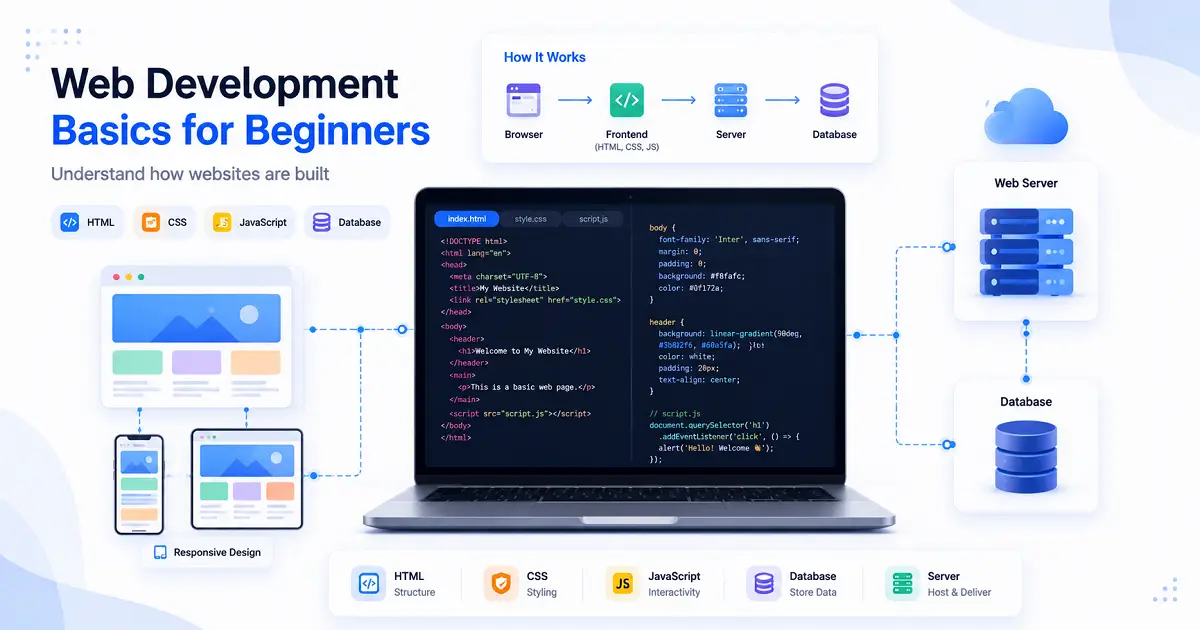
How Does a Website Reach Your Screen?
Imagine typing a website address into your browser and pressing Enter.
Within moments, the page appears on your screen. Behind this simple action, several systems work together.
- Your browser sends a request through the internet.
- The request reaches the website's server.
- The server finds the required files.
- Those files are sent back to your browser.
- Your browser processes the files and displays the webpage.
This entire sequence usually finishes in less than a second, but it involves many technologies working together behind the scenes.
The Three Technologies Every Website Starts With
Every beginner should become familiar with three core technologies because they form the foundation of almost every website on the internet.
HTML – The Structure
HTML (HyperText Markup Language) creates the structure of a webpage. It tells the browser where headings, paragraphs, images, buttons, tables, and links should appear.
Think of HTML as the framework of a building. Without it, there would be nothing for visitors to see.
CSS – The Design
Once the structure exists, CSS (Cascading Style Sheets) controls how everything looks.
Colors, fonts, spacing, layouts, animations, and responsive designs are all created using CSS. Without CSS, every website would appear as plain text with almost no visual design.
JavaScript – The Interaction
JavaScript adds intelligence to a webpage.
Features like dropdown menus, sliders, image galleries, dark mode, form validation, live notifications, and interactive dashboards are all powered by JavaScript.
Instead of creating static webpages, JavaScript allows websites to respond to user actions instantly.
Building a Website Is Like Building a House
A simple comparison makes web development much easier to understand.
- HTML is the foundation, walls, and rooms.
- CSS is the paint, furniture, lighting, and decoration.
- JavaScript is the electricity, switches, and smart devices that make everything interactive.
Just as a house needs all three to become comfortable and functional, a modern website relies on HTML, CSS, and JavaScript working together.
Learning Web Development Step by Step
One of the biggest mistakes beginners make is trying to learn everything at once. In reality, web development becomes much easier when you build your knowledge gradually.
Most learners begin with HTML, move on to CSS for styling, then learn JavaScript for interactivity. After becoming comfortable with these technologies, they explore topics such as APIs, backend development, databases, hosting, and deployment.
If you're new to APIs, our guide on What Is an API and How Does It Work? explains how websites communicate with servers and third-party services. Understanding APIs alongside basic web development provides a much clearer picture of how modern websites actually function.
Understanding Frontend and Backend Development
Once you understand the basics of HTML, CSS, and JavaScript, the next step is learning how different parts of a website work together. This is where the concepts of frontend and backend development become important.
Many beginners believe a website is only what they can see on the screen. In reality, every modern website has two major parts. One is responsible for everything visitors interact with, while the other handles all the work happening behind the scenes.
Both parts are equally important. Without a frontend, users would have nothing to see. Without a backend, websites would not be able to process logins, save user data, or display dynamic content.
Frontend Development
Frontend development focuses on everything users directly see and interact with inside a browser.
When you visit a website, the layout, colors, buttons, images, menus, forms, and animations are all created by frontend technologies.
Frontend developers work to make websites attractive, responsive, and easy to use across desktops, tablets, and smartphones.
- Creating webpage layouts
- Designing navigation menus
- Improving user experience
- Making websites mobile friendly
- Adding interactive elements
If you'd like to learn this topic in greater detail, continue with our article on Frontend vs Backend Development: What's the Difference?.
Backend Development
Backend development manages everything visitors cannot see.
Whenever you log into an account, submit a contact form, place an online order, or update your profile, backend systems receive your request, process the information, and return the appropriate response.
The backend is responsible for business logic, databases, authentication, security, APIs, and server-side processing.
Without backend development, websites would simply display static pages with no ability to store or retrieve information.
Where Databases Fit Into Web Development
Most websites need to store information permanently. That information is kept inside databases.
Whenever you create an account on a website, your information isn't saved inside HTML files. Instead, it is stored securely inside a database.
Examples of information stored in databases include:
- User accounts
- Passwords (encrypted)
- Product catalogs
- Blog posts
- Customer orders
- Comments and reviews
- Payment records
Every time you log in again, the website retrieves your information from the database through the backend.
How Frontend, Backend and Database Work Together
Let's imagine you log into an online shopping website.
- You enter your email and password.
- The browser sends this information to the backend.
- The backend checks the database.
- If your details match, access is approved.
- Your dashboard loads with your personal information.
Although this process feels instant, several technologies are working together within a second.
Why Responsive Websites Matter Today
People no longer browse websites using only desktop computers.
Millions of users visit websites from smartphones, tablets, laptops, smart TVs, and even foldable devices. Because screen sizes vary significantly, websites must automatically adjust their layouts.
This is known as responsive web design.
Responsive websites improve readability, navigation, and overall user experience regardless of the device being used.
You'll learn this concept in detail in our guide Responsive Web Design Explained for Beginners.
From Your Computer to the Internet
Writing website code on your computer is only the first step.
If you want other people to visit your website, it must be published online.
This requires two important things:
- A domain name
- Web hosting
A domain name is the address people type into their browser, while hosting stores your website files on servers connected to the internet.
Together, they make your website available to visitors anywhere in the world.
Understanding Domain Names
Imagine trying to remember the numerical IP address of every website you visit. That would be nearly impossible.
Domain names solve this problem by providing simple, memorable addresses such as:
- google.com
- wikipedia.org
- typenest.in
If you're curious about how domains work and why they're essential, read our guide What Is a Domain Name and How Does It Work?.
What Does Web Hosting Do?
Once your website has been created, its files need a place to live.
That's exactly what web hosting provides.
Hosting companies operate powerful servers that store website files and deliver them whenever someone visits your website.
Without hosting, nobody else would be able to access your website online.
If you're interested in learning how hosting works, continue with What Is Web Hosting? Everything Beginners Need to Know.
How Search Engines Help People Find Websites
Building a website doesn't automatically bring visitors.
People usually discover websites through search engines like Google.
Search engines continuously scan websites, organize information, and display the most relevant pages when users search for something.
Understanding this process is important because even a well-designed website needs visibility to attract visitors.
Our guide on How Search Engines Work explains how Google discovers, indexes, and ranks websites.
Common Tools Used in Web Development
Professional web developers rely on a variety of tools throughout the development process. These tools help them write code faster, identify errors, test websites on different devices, and manage projects efficiently.
Fortunately, beginners don't need dozens of software programs to get started. A few reliable tools are enough to begin learning and building websites.
Code Editors
A code editor is where developers write HTML, CSS, JavaScript, and other programming languages.
Good code editors provide features such as syntax highlighting, auto-completion, project organization, and error detection, making development faster and easier.
Many beginners start with lightweight editors before moving to more advanced development environments as their skills improve.
Web Browsers
Web browsers are not only used to visit websites—they're also essential development tools.
Modern browsers include built-in developer tools that allow developers to inspect webpage elements, identify layout issues, debug JavaScript, measure loading speed, and test responsive layouts.
These tools save hours of troubleshooting during website development.
Version Control
Imagine spending weeks building a website and accidentally deleting important files.
Version control systems help prevent this problem by keeping track of every change made to a project.
Developers can restore previous versions, collaborate with team members, and safely experiment without worrying about losing their work.
Skills Every Beginner Should Develop
Many people believe web development is only about learning programming languages. While coding is important, successful developers also build several other practical skills.
- Problem-solving ability
- Logical thinking
- Attention to detail
- Patience while debugging
- Continuous learning
- Communication skills
- Time management
Technology changes constantly. New frameworks, tools, and best practices appear every year. The developers who continue learning throughout their careers usually adapt more successfully than those who rely only on existing knowledge.
Career Opportunities in Web Development
One of the biggest advantages of learning web development is the wide variety of career paths available.
Some professionals specialize in designing beautiful user interfaces, while others focus on server management, databases, APIs, or cloud infrastructure.
Common career options include:
- Frontend Developer
- Backend Developer
- Full-Stack Developer
- Web Designer
- UI/UX Developer
- Software Engineer
- Technical Consultant
- Freelance Web Developer
Many businesses also hire web developers to maintain company websites, build internal software, and improve online customer experiences.
Can You Learn Web Development Without a Computer Science Degree?
Absolutely.
Some of today's successful web developers started by building small personal websites, experimenting with simple HTML pages, and gradually expanding their knowledge.
Employers often value practical skills and real projects more than academic qualifications alone.
A portfolio containing websites you've built demonstrates your abilities far better than simply listing technologies on a resume.
Common Mistakes Beginners Should Avoid
Almost every beginner makes mistakes while learning web development. These mistakes are completely normal and often become valuable learning experiences.
Trying to Learn Everything at Once
Many newcomers attempt to learn HTML, CSS, JavaScript, React, Node.js, databases, APIs, hosting, and deployment simultaneously.
This usually leads to confusion.
Instead, build a strong foundation before moving to advanced topics.
Ignoring Responsive Design
Some beginners design websites that look perfect on a desktop but become difficult to use on mobile devices.
Since mobile traffic now represents a significant portion of internet usage, responsive design should be considered from the beginning.
Skipping Practice
Reading tutorials is helpful, but real progress comes from building projects.
Even simple practice websites improve your understanding far more than reading documentation alone.
Not Understanding How Technologies Connect
Learning technologies individually is useful, but understanding how they work together is even more important.
For example:
- HTML creates the structure.
- CSS controls the appearance.
- JavaScript adds interactivity.
- APIs connect applications.
- Hosting publishes the website.
- Search engines help users discover it.
Once you see the complete picture, web development becomes much easier to understand.
What Should You Learn After Web Development Basics?
After understanding the fundamentals, beginners usually continue learning more specialized topics.
A practical learning path looks like this:
- HTML
- CSS
- JavaScript
- Responsive Web Design
- Frontend Development
- Backend Development
- APIs
- Databases
- Version Control
- Website Deployment
Following this sequence makes learning much less overwhelming because each topic builds naturally on the previous one.
Why Web Development Will Continue to Grow
The internet continues expanding every year.
Businesses are launching new websites, educational institutions are offering online learning, governments are digitizing public services, and entrepreneurs are creating web-based products for customers around the world.
As long as organizations continue building digital experiences, skilled web developers will remain in demand.
Even with modern website builders and AI-powered tools becoming more common, experienced developers are still needed to build secure, scalable, and customized solutions that meet real business requirements.
Looking Ahead
Learning web development is not about memorizing hundreds of programming commands. It's about understanding how different technologies work together to create useful digital experiences.
Once you understand the basics, every new concept becomes easier to learn because you already understand the foundation on which modern websites are built.
Whether your goal is to build your own website, become a freelance developer, work for a technology company, or simply understand how the internet works, web development provides valuable knowledge that will remain useful for years to come.
Frequently Asked Questions
1. Is web development difficult for beginners?
Not at all. Like any new skill, web development takes time and regular practice, but beginners can start with simple technologies such as HTML and CSS. Once you understand the basics, learning JavaScript, APIs, and backend development becomes much easier.
2. What should I learn first?
A recommended learning order is HTML, CSS, JavaScript, responsive web design, frontend development, backend development, APIs, databases, and finally deployment. Learning step by step helps build a strong foundation without feeling overwhelmed.
3. Do I need a computer science degree?
No. Many successful web developers are self-taught. Employers and clients usually care more about your practical skills and portfolio than your academic qualification. Building real projects is one of the best ways to demonstrate your abilities.
4. Which programming language is best for web development?
JavaScript is the most widely used programming language for web development because it works directly inside web browsers. Depending on your goals, you may also learn languages such as Python, PHP, Java, or C# for backend development.
5. Can I build a website using only HTML and CSS?
Yes. HTML and CSS are enough for creating simple static websites such as portfolios, personal blogs, or business landing pages. However, if you want features like user accounts, online payments, or live data, you'll also need JavaScript and backend technologies.
6. How long does it take to learn web development?
The learning time depends on your goals and practice schedule. Someone who studies consistently for a few months can build simple websites, while becoming a professional developer usually requires continuous learning and hands-on project experience.
7. Is web development still a good career in 2026?
Yes. Businesses, educational institutions, startups, and government organizations continue to invest in websites and web applications. Skilled web developers remain in demand because companies need secure, fast, and user-friendly digital experiences.
8. What should I learn after understanding web development basics?
After learning the fundamentals, explore topics such as APIs, frontend and backend development, responsive web design, web hosting, domain names, and programming languages. These concepts help you understand how complete websites are planned, developed, and published.
Related Articles
- What Is an API and How Does It Work?
- How Search Engines Work: A Beginner's Guide to Google Search
- What Is Web Hosting? Everything Beginners Need to Know
- What Is a Domain Name and How Does It Work?
- Frontend vs Backend Development: What's the Difference?
- Responsive Web Design Explained for Beginners
- Best Programming Languages for Beginners in 2026
Final Thoughts
Web development is much more than writing code. It is the process of turning ideas into websites and web applications that people use every day for communication, education, shopping, entertainment, banking, and business. Every webpage you visit is the result of multiple technologies working together behind the scenes.
For beginners, the field may seem large at first, but it becomes much easier when you focus on learning one concept at a time. Start with HTML to build webpage structure, use CSS to improve appearance, and learn JavaScript to add interactivity. As your confidence grows, you can explore APIs, backend development, databases, hosting, and deployment.
One of the biggest advantages of learning web development is that it combines creativity with problem-solving. Whether you want to build personal projects, create websites for clients, launch an online business, or pursue a technology career, these skills provide countless opportunities.
Technology will continue to evolve, but the fundamentals of web development will remain valuable because every modern website depends on them. Building a strong foundation today makes learning advanced tools and frameworks much easier in the future.
The best way to improve is by creating real projects. Every webpage you build teaches something new and brings you one step closer to becoming a confident web developer.
Continue Learning with TypeNest
Web development is a combination of many technologies working together. By understanding the fundamentals of HTML, CSS, JavaScript, servers, databases, domains, and hosting, you've taken the first step toward building modern websites and web applications.
Continue practicing by creating small projects, experimenting with new technologies, and learning one concept at a time. Consistent practice is the fastest way to become a confident web developer.
Last Updated: July 2026
Author: TypeNest Editorial Team