Why Every Website Needs Web Hosting
When people visit a website, they usually focus on what appears on the screen—articles, images, videos, buttons, or products. Very few stop to think about where all that information actually comes from. A website doesn't simply exist on the internet by itself. Every webpage, image, stylesheet, and database must be stored somewhere before anyone can access it.
That "somewhere" is called web hosting. It is one of the most important building blocks of the internet. Without web hosting, websites would have no permanent place to store their files, making them impossible for visitors to access online.
Whether you're creating a personal portfolio, a business website, an online store, or an educational platform, choosing the right hosting service is just as important as designing the website itself. Even a beautifully designed website cannot perform well if it is hosted on an unreliable server.
In this guide, you'll learn what web hosting is, how it works behind the scenes, why every website depends on it, and how beginners can choose the right hosting solution for their needs.
What Is Web Hosting?
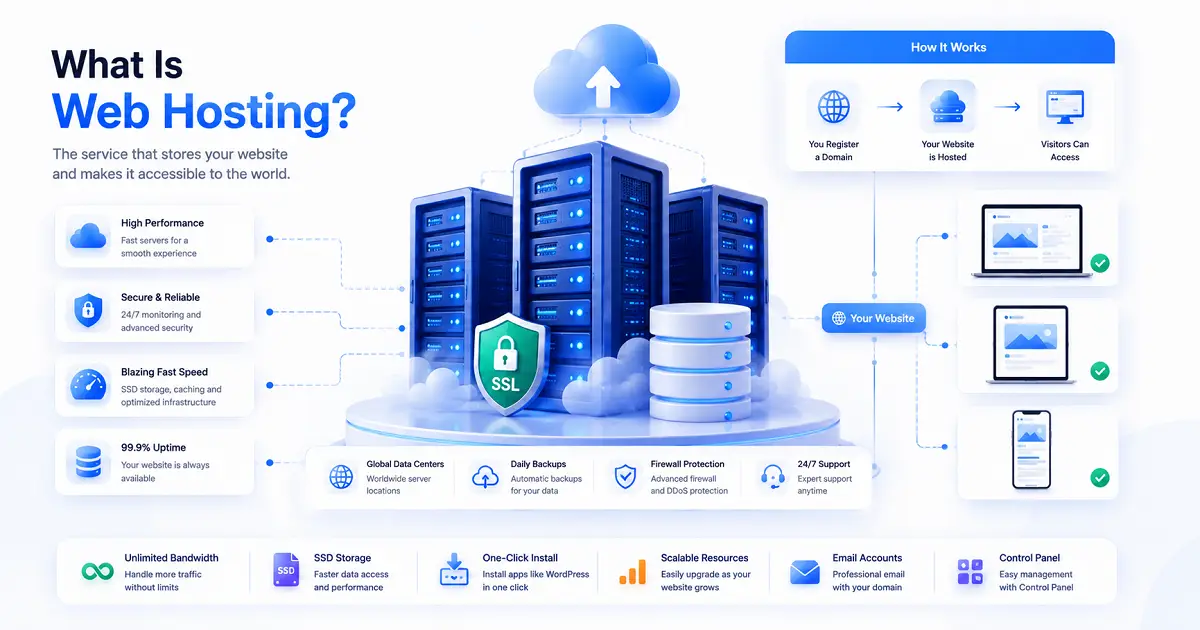
Web hosting is a service that stores website files on computers known as web servers. These servers remain connected to the internet twenty-four hours a day, allowing people from anywhere in the world to access websites whenever they want.
Every website contains many different types of files. These include HTML pages, CSS stylesheets, JavaScript files, images, videos, documents, fonts, and sometimes databases that store user information. All of these resources must be stored securely before a browser can display them.
When someone visits your website, the hosting server quickly sends those files to the visitor's browser. The browser then arranges everything into the webpage that appears on the screen.
Without hosting, there would be nowhere to store those files permanently, meaning your website simply wouldn't exist online.
Think of Hosting Like Renting a Shop
Understanding web hosting becomes much easier with a simple real-world example.
Imagine you want to open a bookstore.
Before customers can visit, you first need a physical shop where all your books can be kept. Without that shop, customers would have nowhere to find your business.
A website works in exactly the same way.
- Your website files are like the books.
- The hosting server is like the shop.
- Your domain name is the shop's address.
- Your visitors are the customers.
Only when all of these work together can people successfully visit your website.
What Happens When Someone Opens Your Website?
The entire process usually takes less than a second, but several important steps happen behind the scenes.
- A visitor types your domain name into a web browser.
- The browser locates the correct hosting server.
- The hosting server receives the request.
- It finds the required website files.
- The server sends those files back to the browser.
- The browser displays the complete webpage.
This communication happens every single time someone opens a webpage on the internet. Whether the visitor is reading a blog article, watching a video, or purchasing a product, the hosting server is responsible for delivering the required content.
Why Good Hosting Makes Such a Big Difference
Many beginners assume that all hosting services are basically the same. In reality, the quality of your hosting directly affects how visitors experience your website.
A fast and reliable hosting provider helps webpages load quickly, keeps the website available throughout the day, and protects important data from security threats.
Poor hosting can create the opposite experience. Slow loading pages, frequent downtime, security problems, and unreliable performance often frustrate visitors and may even reduce search engine visibility.
For website owners, choosing quality hosting isn't simply about keeping a website online—it's about creating a better experience for every visitor.
What Does a Hosting Company Actually Do?
A hosting company operates powerful computers inside secure facilities known as data centers. These servers are specifically designed to run websites continuously without interruption.
Unlike ordinary personal computers that are turned off at night, hosting servers operate around the clock with backup power supplies, advanced cooling systems, high-speed internet connections, and multiple security measures.
Hosting companies also monitor these servers to ensure they remain stable, secure, and available whenever visitors request website content.
This allows website owners to focus on creating content rather than managing complex server hardware themselves.
Web Hosting and Domain Names Work Together
One of the most common misunderstandings among beginners is confusing web hosting with a domain name.
Although they work together, they perform completely different jobs.
A domain name is simply the address people type into their browser, such as typenest.in.
Web hosting is the service that stores all the files connected to that address.
Without hosting, the domain would point to nothing. Without a domain, people would have no easy way to find the hosted website.
If you'd like to understand domain names in more detail, continue with our guide on What Is a Domain Name and How Does It Work?.
Hosting Is Only One Part of Building a Website
Publishing a website involves several technologies working together. First, developers build the website using HTML, CSS, JavaScript, and other tools. After the website is complete, the files are uploaded to a hosting server. A domain name is then connected to that hosting account, making the website accessible to visitors around the world.
If you're completely new to website creation, our guide on Web Development Basics for Beginners explains how websites are built before they are published online.
In the next section, we'll explore the different types of web hosting, how they compare, and which hosting solution is best for beginners, businesses, and growing websites.
Understanding the Different Types of Web Hosting
Not every website has the same requirements. A personal blog that receives a few hundred visitors each month doesn't need the same infrastructure as a large e-commerce store serving thousands of customers every day.
For this reason, hosting companies offer several types of hosting plans. Each one is designed for different budgets, traffic levels, and technical needs.
Choosing the right hosting type doesn't mean selecting the most expensive plan. Instead, it means selecting a hosting solution that matches your website's current requirements while allowing room for future growth.
Shared Hosting
Shared hosting is the most common starting point for beginners. As the name suggests, multiple websites share the resources of a single physical server.
Because server costs are divided among many customers, shared hosting is usually the most affordable option available.
This makes it an excellent choice for people launching their first website or blog.
Best For
- Personal blogs
- Portfolio websites
- Student projects
- Small business websites
- New educational websites
Advantages
- Low monthly cost
- Easy setup
- No server management required
- Beginner friendly
Limitations
- Resources are shared with other websites.
- Performance may decrease during heavy traffic.
- Less control over server settings.
Virtual Private Server (VPS) Hosting
As websites grow, shared hosting may no longer provide enough performance. This is where VPS hosting becomes a practical upgrade.
A Virtual Private Server divides one physical server into several independent virtual servers. Although customers still share the same hardware, each website receives dedicated resources.
This creates a better balance between affordability and performance.
Best For
- Growing business websites
- High-traffic blogs
- Learning platforms
- Medium-sized online stores
Advantages
- Better performance
- More server control
- Improved reliability
- Greater flexibility
Limitations
- Higher cost than shared hosting.
- May require basic server knowledge.
Dedicated Hosting
Dedicated hosting provides an entire physical server for a single customer.
Unlike shared hosting or VPS hosting, no other websites use the server's resources. Everything belongs exclusively to one website or organization.
This offers maximum performance, security, and customization.
Best For
- Enterprise businesses
- Large e-commerce platforms
- Government portals
- Very high-traffic websites
Although dedicated hosting offers outstanding performance, it is significantly more expensive than other hosting options.
Cloud Hosting
Cloud hosting has become increasingly popular because it solves many of the limitations associated with traditional hosting.
Instead of depending on one physical server, cloud hosting distributes website resources across multiple connected servers.
If one server experiences problems, another server immediately takes over. This improves reliability and minimizes downtime.
Cloud hosting also allows resources to increase automatically when website traffic suddenly grows.
Best For
- Fast-growing startups
- Business websites
- Educational platforms
- Applications with changing traffic
Which Hosting Type Should Beginners Choose?
For most beginners, the answer is surprisingly simple.
A shared hosting plan usually provides everything needed to launch a personal website, blog, portfolio, or small business website.
There is no need to purchase expensive hosting on the first day.
As your website grows and attracts more visitors, upgrading to VPS or cloud hosting becomes much easier than starting with an expensive solution.
How to Choose the Right Hosting Provider
Selecting a hosting provider involves much more than comparing prices.
A low-cost hosting plan may appear attractive, but poor performance or unreliable customer support can create significant problems later.
Instead, evaluate hosting providers using several important factors.
Performance
Fast servers help webpages load quickly, improving visitor satisfaction and search engine performance.
Uptime
Most reputable hosting providers guarantee uptime of approximately 99.9%, meaning your website remains available almost all the time.
Customer Support
Technical problems can happen unexpectedly. Choosing a hosting company that provides responsive customer support can save valuable time whenever issues arise.
Security
Reliable hosting providers include security features such as SSL certificates, malware protection, firewalls, and automated monitoring.
Scalability
As your website becomes more popular, you'll eventually need additional resources. A good hosting provider allows you to upgrade your hosting plan without rebuilding your entire website.
Essential Hosting Features You Should Look For
Modern hosting plans often include many additional features that improve website performance and security.
- Free SSL certificate
- Automatic backups
- Email hosting
- One-click WordPress installation
- File manager
- Website migration tools
- Malware scanning
- DDoS protection
- Control panel access
Although not every beginner needs every feature immediately, choosing a hosting provider that includes these services can save both time and money as your website grows.
Hosting Alone Doesn't Build a Website
Hosting stores your website, but it doesn't create the website itself.
Before uploading files to a hosting server, developers first build the website using technologies such as HTML, CSS, JavaScript, databases, and APIs.
For example, websites often use APIs to communicate with payment gateways, maps, weather services, and other online platforms.
In the next section, we'll explore hosting costs, common beginner mistakes, frequently asked questions, and practical tips for choosing the right hosting solution for your first website.
How Much Does Web Hosting Cost?
One of the first questions beginners ask before launching a website is, "How much does web hosting cost?" The answer depends on the type of hosting you choose, the resources your website needs, and the features included in your hosting plan.
Fortunately, creating a website no longer requires a large investment. Today, many hosting providers offer affordable plans suitable for personal websites, blogs, portfolios, and small business websites.
As your website grows, you can upgrade to more powerful hosting plans without rebuilding your website from scratch.
Typical Hosting Costs
| Hosting Type | Typical Monthly Cost |
|---|---|
| Shared Hosting | $2 – $10 |
| VPS Hosting | $10 – $60 |
| Cloud Hosting | $10 – $100+ |
| Dedicated Hosting | $80 – $500+ |
These prices are approximate and vary depending on the hosting company, server resources, contract duration, and additional services included in the plan.
Is Free Hosting a Good Choice?
Free hosting may seem attractive, especially for beginners, but it often comes with significant limitations.
Many free hosting providers place advertisements on websites, limit storage space, restrict bandwidth, and offer little technical support. Performance may also be inconsistent because free servers are usually shared among many users.
For learning basic HTML and CSS, free hosting can be useful. However, if you plan to build a professional website, portfolio, business site, or blog that attracts regular visitors, investing in a reliable hosting provider is generally the better long-term decision.
Common Mistakes Beginners Make When Choosing Hosting
Choosing a hosting plan may appear straightforward, but many beginners make decisions that create problems later. Understanding these common mistakes can help you avoid unnecessary expenses and technical difficulties.
Choosing the Cheapest Plan Without Research
Price is important, but it shouldn't be the only deciding factor.
Very cheap hosting plans sometimes sacrifice speed, uptime, customer support, or security. Saving a few dollars each month may lead to a slower website and a poor experience for visitors.
Ignoring Future Growth
A small website today may become much larger over time.
Selecting a hosting provider that offers easy upgrades allows your website to grow without requiring a complicated migration later.
Not Checking Backup Options
Accidents happen. Files can be deleted, updates can fail, or websites may become infected with malware.
Automatic backups provide peace of mind because they allow websites to be restored if something goes wrong.
Ignoring Security Features
Cybersecurity should never be treated as an optional feature.
A reliable hosting provider should include SSL certificates, firewall protection, malware detection, and regular security updates to help protect your website and its visitors.
Not Reading Customer Reviews
Before purchasing hosting, it's worth reading reviews from real customers.
Reviews often reveal important information about customer support quality, server reliability, billing practices, and long-term performance that marketing pages may not mention.
How to Know When It's Time to Upgrade
Most websites begin with modest hosting requirements, but those needs often change as visitor numbers increase.
You may want to consider upgrading your hosting plan if you notice any of the following:
- Your website loads much more slowly than before.
- You regularly experience downtime.
- Traffic has increased significantly.
- Your hosting storage is almost full.
- You need additional security or server control.
- Your website includes advanced applications or databases.
Upgrading at the right time helps maintain performance without disrupting the visitor experience.
Hosting and Website Performance
Website speed has become one of the most important aspects of user experience.
Visitors expect webpages to load quickly. If a website takes too long, many users simply leave and look elsewhere.
A reliable hosting provider contributes to better performance by using faster storage devices, optimized server software, modern hardware, and efficient network infrastructure.
Although website optimization also depends on good coding practices and image optimization, quality hosting provides a strong technical foundation.
Hosting and Search Engine Optimization
While hosting alone won't guarantee higher search rankings, it can influence several technical factors that affect SEO.
Search engines generally prefer websites that load quickly, remain available consistently, and provide secure browsing through HTTPS connections.
Reliable hosting supports these goals by improving uptime, reducing server response times, and maintaining stable website performance.
If you'd like to understand how search engines evaluate websites after they're published online, our guide on How Search Engines Work explains crawling, indexing, and ranking in greater detail.
How Hosting Fits Into the Complete Website Journey
Building and publishing a website involves several connected technologies working together.
- Design and develop the website.
- Register a domain name.
- Purchase a hosting plan.
- Upload website files.
- Connect the domain to the hosting server.
- Test the website.
- Allow search engines to discover and index the pages.
Understanding this complete process helps beginners see how web development, domains, hosting, APIs, and search engines all work together to make websites accessible on the internet.
In the final section, we'll answer common questions, provide related learning resources, and summarize everything you've learned about web hosting.
Frequently Asked Questions
1. Do I need web hosting for every website?
Yes. Every website needs a place where its files are stored so visitors can access them over the internet. Whether you build a personal blog, business website, portfolio, or online store, your website must be hosted on a server before anyone can visit it.
2. Can I change my hosting provider later?
Absolutely. Most websites can be moved from one hosting provider to another. Many hosting companies even offer free website migration services, making the process easier for beginners. Before switching, always create a complete backup of your website.
3. Is shared hosting enough for beginners?
For most beginners, yes. Shared hosting is affordable, easy to manage, and provides enough resources for personal blogs, portfolio websites, educational websites, and small business projects. As your traffic grows, you can upgrade to VPS or cloud hosting without rebuilding your website.
4. Does web hosting affect website speed?
Yes. The quality of your hosting provider has a direct impact on website performance. Faster servers, modern hardware, optimized storage, and reliable network infrastructure help webpages load more quickly, creating a better experience for visitors.
5. What's the difference between web hosting and a domain name?
A domain name is the address people type into their browser, such as example.com. Web hosting is the service that stores all the website files connected to that address. A website needs both to become accessible on the internet.
6. Which hosting type is best for a growing website?
If your website is beginning to receive more visitors than a shared hosting plan can comfortably handle, VPS hosting or cloud hosting usually becomes the next logical step. Both provide better performance and greater flexibility for growing websites.
7. Can I host a website on my own computer?
Technically, yes. However, maintaining a personal server requires continuous internet connectivity, reliable hardware, security management, backups, and regular maintenance. For most individuals and businesses, using a professional hosting provider is far more practical and reliable.
8. What should beginners learn after understanding web hosting?
After learning how hosting works, it's useful to understand domain names, search engines, frontend and backend development, responsive web design, and APIs. Together, these topics explain how websites are built, published, discovered, and maintained on the internet.
Related Articles
If you're building your understanding of websites and internet technologies, these beginner-friendly guides are excellent next steps.
- Web Development Basics for Beginners
- What Is an API and How Does It Work?
- How Search Engines Work: A Beginner's Guide to Google Search
- What Is a Domain Name and How Does It Work?
- Frontend vs Backend Development: What's the Difference?
- Responsive Web Design Explained for Beginners
- Best Programming Languages for Beginners in 2026
Final Thoughts
Web hosting is one of the essential technologies that keeps the internet running. Every website—whether it's a personal blog, an online business, a university portal, or a global e-commerce platform—depends on hosting servers to store files and deliver content to visitors around the world.
For beginners, hosting may seem like a technical concept, but its purpose is straightforward. It provides a secure and reliable home for your website, ensuring that people can access it whenever they visit your domain name.
Choosing the right hosting plan doesn't mean selecting the most expensive option. The best hosting solution is the one that matches your website's current needs while giving you the flexibility to grow in the future. Starting with a reliable shared hosting plan and upgrading as your traffic increases is often the smartest approach.
It's also important to remember that hosting is only one part of a complete website. A successful online presence combines good web development, a memorable domain name, reliable hosting, quality content, responsive design, and strong search engine visibility. When these elements work together, visitors enjoy a faster, safer, and more reliable browsing experience.
As you continue learning about web technologies, understanding how hosting fits into the bigger picture will make it much easier to build, manage, and grow websites with confidence.
Continue Learning with TypeNest
Web hosting is one of the essential building blocks of every website. Once you understand how hosting works, choosing the right hosting plan, managing website performance, and launching your own website become much easier.
Continue exploring beginner-friendly technology guides to learn how domains, hosting, web development, and search engines work together to create and publish websites on the internet.
Last Updated: July 2026
Author: TypeNest Editorial Team